


Today we are announcing the release of HashiCorp Boundary 0.21, which includes the general availability of RDP credential injection and new enhancements to the Boundary Desktop client. Both capabilities improve organizations’ security posture while providing a simpler connection UX for end users.
See a demo of this feature in action:
Demo of the user experience and configuration of Boundary credential injection for RDP
»What is HashiCorp Boundary?
Boundary is aimed at solving the challenges most organizations face when solely relying on traditional tools like VPNs and bastion hosts for remote access onto a private network. Once on the network, users can connect to individual infrastructure resources (Linux/Windows hosts, databases, web applications, Kubernetes clusters, etc.). While providing access onto a network is simple with these traditional tools, managing credentials and enforcing least privilege access in a dynamic environment can be challenging and may require additional tools, increasing complexity. HashiCorp Boundary was developed to address these security challenges without affecting the management complexity or hindering the end user experience.
HashiCorp Boundary is an identity-based secure remote access platform that makes it easier and more secure for end users to remotely access infrastructure resources compared to traditional methods. Boundary also centrally handles credential retrieval and injection into sessions, resulting in a passwordless experience. Boundary helps organizations meet ISO, SOC 2, and several other compliance standards by improving their overall security posture with least-privilege access to infrastructure resources and detailed user activity logging, including SSH session recordings.
»RDP credential injection
Background: According to Verizon's 2025 Data Breach Investigations Report, 88% of attacks targeting web applications involved compromised credentials, with stolen credentials responsible for approximately one-third of breaches over the last decade. For Windows-heavy organizations, this manual credential handling represents a huge security gap, and protecting credentials for the hundreds or thousands of resources in the network is not a capability offered by VPNs or jump boxes.
Early in its development, HashiCorp Boundary transformed Linux access security with SSH credential injection, which enabled a passwordless user experience and prevented SSH credentials from unnecessary exposure. After seeing the ease and speed of this workflow, Windows customers have expressed interest in having the same passwordless, secure access experience for remote desktop protocol (RDP) connections.
What’s new: In the previous Boundary 0.20 release, RDP credential injection was available as a public beta. After improvements based on customer feedback, RDP credential injection is now generally available — extending Boundary's passwordless, secure access capabilities to Windows Server environments. This feature drastically mitigates credential exposure risks for RDP connections while providing the same, snappy user experience that has made SSH credential injection so popular.
Let’s explore the problem that RDP credential injection solves, how this feature works, and why this release represents a major step forward in securing Windows infrastructure.
»The Windows credential challenge
Organizations with significant Windows infrastructure face a persistent security challenge. Traditional RDP workflows force users to manually handle credentials. This typically results in engineers using secrets management anti-patterns such as:
Copying passwords from password managers
Typing usernames and domains
Storing credentials in insecure locations
This manual handling creates multiple attack vectors:
When users copy and paste RDP credentials, those credentials are temporarily stored in clipboard memory where malware, keyloggers, or screen scrapers can capture them. Even brief exposure can lead to credential theft and unauthorized access.
Credentials are often shared between users or stored in code, scripts, or repositories, increasing the likelihood of exposure to unauthorized entities.
Windows environments often rely on long-lived, shared service accounts that are difficult to rotate due to their widespread use. These static credentials become attractive targets for attackers and create compliance headaches for security teams.
The prior workflow for RDP credentials in Boundary required users to juggle authentication, retrieve brokered credentials, then manually enter them into RDP clients.
»Seamless Windows access without credential exposure
RDP credential injection in Boundary transforms Windows access by completely eliminating user interaction with credentials. Here's how it works:
Identity-based authentication: Users authenticate to Boundary once using their existing identity provider (Okta, Azure Entra ID, IBM Verify Identity, etc.) or Boundary's built-in authentication methods.
Automatic credential injection: When users connect to Windows targets, Boundary workers automatically inject the appropriate credentials into the RDP authentication process. Users never see usernames, passwords, or domain information.
Protocol-aware proxying: Boundary understands the RDP protocol deeply, intercepting authentication flows and seamlessly injecting credentials using the same enterprise-grade security protocols that your Windows domain expects: Kerberos and NTLMv2.
»Boundary UX enhancements for RDP
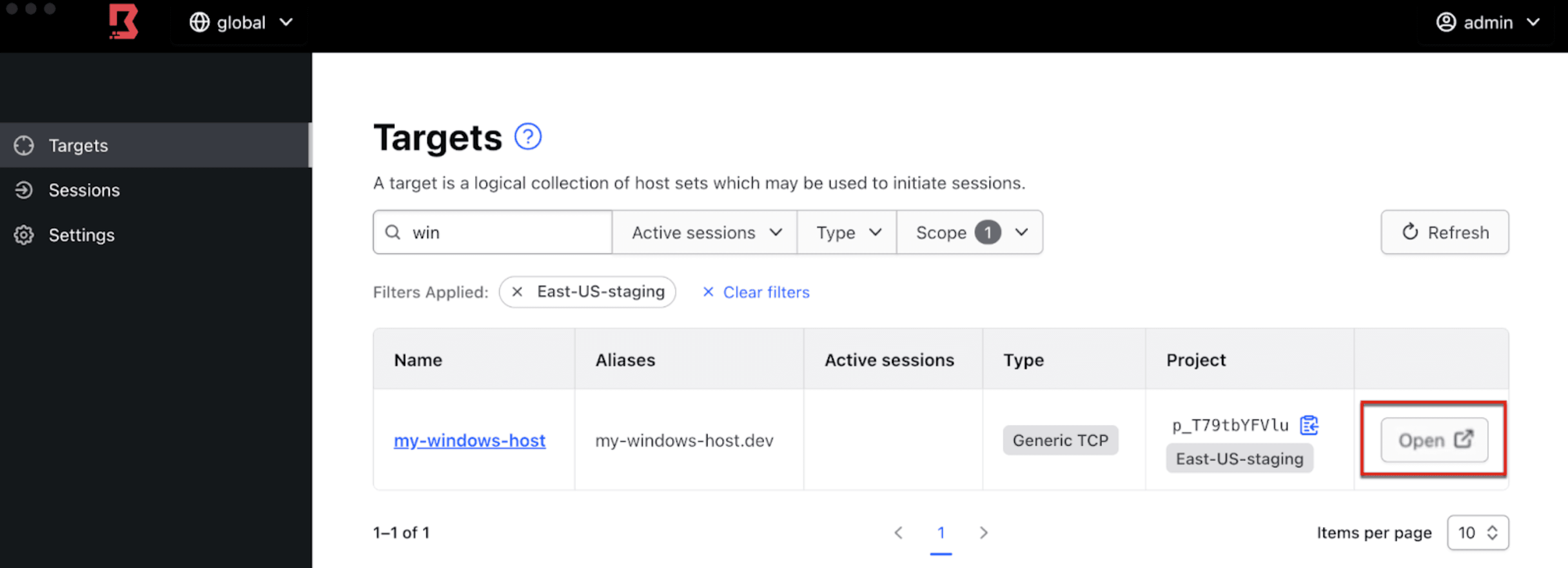
RDP credential injection works behind the scenes and therefore the entire experience is transparent to the users. Users can connect to RDP targets in multiple ways, including using their existing RDP client. A new Boundary Desktop client enhancement makes it even easier by auto-launching RDP clients from the Boundary Desktop client for an intuitive workflow.
Once a user is authenticated to the Boundary Desktop client (available for macOS and Windows machines), end users can connect to RDP targets by simply clicking on the Open button. This will automatically launch the RDP client (Windows App on macOS or Microsoft Remote Desktop on Windows) with the appropriate IP address and port number populated. If RDP injection is enabled, login credentials are also handled on the user’s behalf. This results in a streamlined workflow that allows users to connect using familiar client tools without the hassle or security risks of manually handling credentials.
»Getting started with RDP credential injection
The RDP credential injection is generally available now in Boundary Enterprise and HCP Boundary as part of the 0.21 release. The feature requires no changes to existing Windows infrastructure and works with your current RDP clients in supported configurations. To get started:
Upgrade your Boundary cluster to 0.21: Download the latest release or upgrade your HCP Boundary cluster.
Review supported configurations: Ensure your Windows targets and RDP clients match the tested configurations outlined in our documentation.
Configure RDP targets: Create RDP target resources in your Boundary configuration, specifying the Windows servers you want to protect.
Set up credential sources: Configure static credentials in Boundary
Test the workflow: Install the latest Boundary Desktop client onto your local machine, authenticate to Boundary, and connect to your Windows targets using supported RDP client tools.
To learn more about the RDP credential injection:
Read our Credential injection documentation
Try it yourself with a free HCP Boundary account
Join our community forum or share feedback