

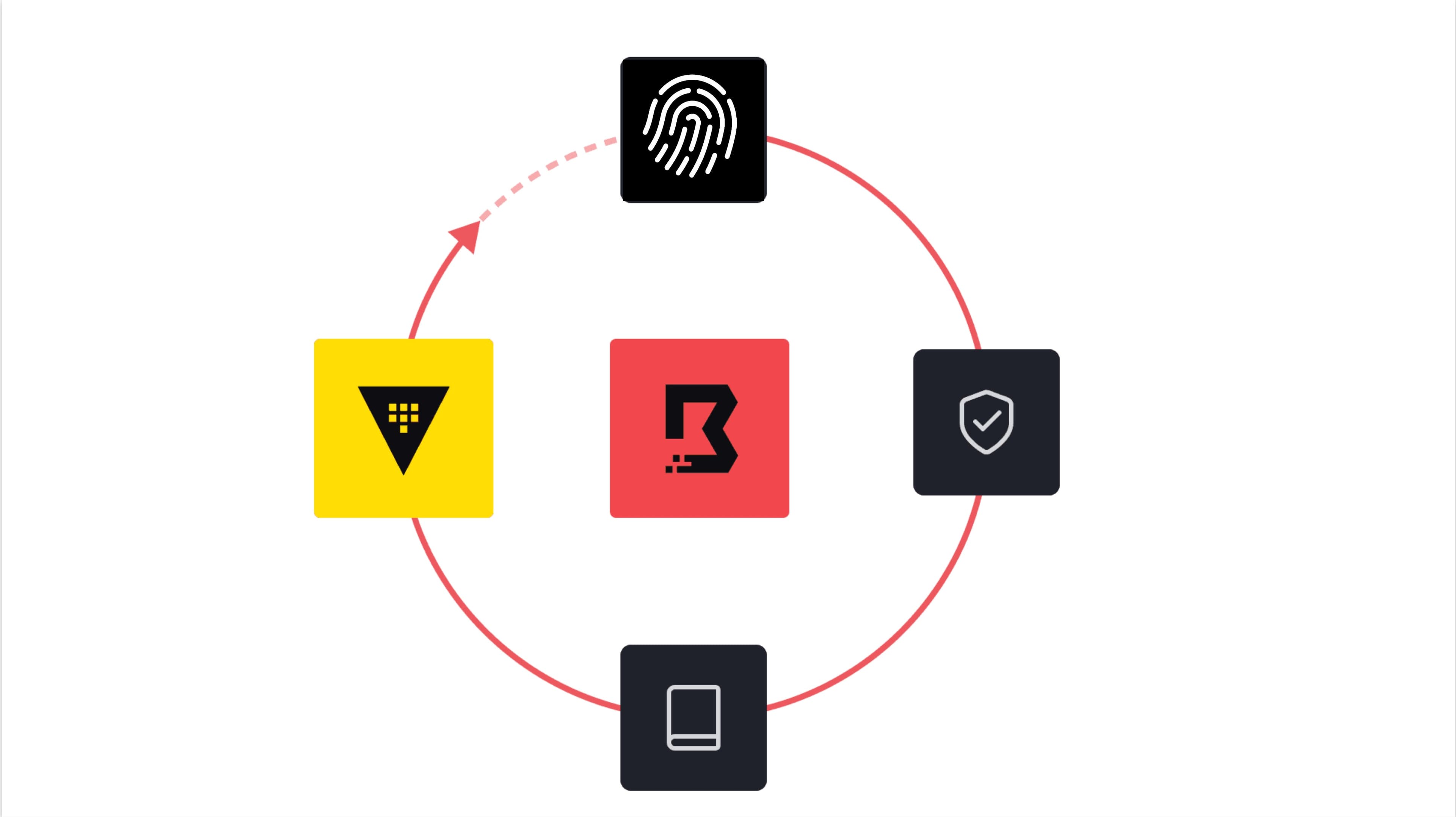
Traditional identity and access management (IAM) models were built with human users with predictable access patterns. However, AI agents operate in a different manner. Agents can reason and invoke tools, accessing services and databases across your infrastructure landscape in unpredictable and dynamic ways.
As AI agents go from experimental to production, they will increasingly be granted direct network access to critical infrastructure resources such as databases, APIs, internal web services, cloud platforms, and operational systems. A big concern is agents improperly being provided with long-lived static credentials that are poorly managed, rarely rotated, and difficult to audit. This gives AI agents broad access and limited oversight. Without proper guardrails, AI agents may autonomously make decisions or execute actions that negatively impact production workloads, corrupt data, trigger outages, or unintentionally expose sensitive information. In addition, the lack of unified visibility into every agent's behavior across the environment is also a security and audit concern. Many organizations need a way to monitor what sessions are active, what systems AI agents are accessing, when they access them, what actions they perform, or whether their behavior deviates from policy.
The dynamic nature of agentic runtimes changes when access controls need to apply. Identity, authorization, and session control policies can’t be set at deploy time. They need to be enforced at the time of access. As agentic workloads scale, each agent needs a unique identity and just-in-time (JIT) privileges to ensure that expanding your AI footprint doesn’t also expand your attack surface.
»HashiCorp Boundary and agentic AI workflows
Boundary is a great match for agentic AI workflows, as it provides solutions for each of the problems we outlined above. Building on the foundational capabilities of controlling access for human identities, Boundary applies similar principles to ensure non-human and agentic identities do not have overprivileged access or handle static long-lived credentials. As AI agents start to act more autonomously, Boundary gives control back to security and IT administrators to govern precisely what AI agents can access. In addition, Boundary provides monitoring, audit logs, and session recordings that can be used to play back and reveal detailed actions taken by AI agents during session access. Boundary becomes the central security element that allows organizations to universally control and monitor infrastructure access for human, non-human, and AI agent identities.
»JIT access
Boundary delivers JIT access to network resources while enforcing identity-based authorization and role-based access control (RBAC). This is especially important for agentic AI workloads because Boundary serves not only as an authentication or secret-management layer, but also as a secure point-of-use access layer for private hosts and services.
With Boundary’s authorization flow, access to a specific resource is granted only when needed, for a specific action, and only for the duration of that session. This helps organizations strengthen governance and maintain tighter control over how AI agents access critical infrastructure.
»Dynamic credentials and abstraction
Despite years of advancements in secrets management, many organizations still allow the usage of static credentials. Static credentials create a serious security risk for any organization, as they tend to lack frequent rotation and are often shared across multiple teams and workloads. Boundary addresses this in two ways.
With credential injection, Boundary ensures that credentials are not exposed even if credentials are static. When sessions are established, Boundary injects credentials directly into the session on behalf of the AI agent, abstracting credentials from AI agents. Agent do not directly manage or persist credentials. This eliminates the chances of credentials being reused, shared, or exposed even if they are static.
Secondly, Boundary can facilitate the usage of modern dynamic credentials rather than static credentials. When paired with HashiCorp Vault, access with dynamic credentials becomes easy. Vault’s secrets engines generate short-lived credentials that expire after use, so even if a credential is intercepted, it cannot be used to cause damage. When an AI agent initiates a session to an authorized target, Boundary automatically retrieves a dynamic credential from Vault and injects it directly into the session. This matters most in agentic workloads, where embedded secrets inside tool runners, MCP servers, and orchestration frameworks are among the most exploitable attack vectors in the stack.
»Session-focused control plane
When we think about providing access for agentic workflows, the common challenge every organization faces is controlling the sessions and connections each identity is allowed to access. This is not a new challenge, but one that already exists with human identities. However, it has been exacerbated with the new wave of AI agents that will attempt to access resources in every corner of a network. While orchestration frameworks and MCP servers help agents discover and invoke tools, they are not designed to provide infrastructure-grade runtime access control or session brokering. Some architectures rely on application-layer gateways that inspect and mediate every tool/API request, which can introduce additional complexity as agent activity scales. Boundary instead enforces identity-aware authorization at the connection/session layer before infrastructure access is established. With Boundary, once an AI agent’s identity has been authenticated, it is placed into different groups or roles that automate which infrastructure resources it’s allowed to access. The entire network is abstracted away from agents, limiting them from having unfettered access to your network. All connections pass through a Boundary proxy, ensuring that only authorized identities can establish sessions.
»Complete visibility and auditability
As the number of agents grows exponentially, organizations are facing the challenge of tracking the access taken by legions of agents that they often cannot see. This makes zero trust enforcement and comprehensive visibility extremely critical. Since Boundary is already managing access, it also offers centralized visibility for both AI agents and the human identities they operate on behalf of. Security and IT administration teams can rely on Boundary to track and log every access taken by each identity. Session monitoring gives admins the option to terminate live sessions as needed. And any interactive SSH access (with other protocols to follow) deemed questionable can be played back for analysis and remediation. These capabilities ensure organizations stay compliant despite giving more control to AI agents. Organizations can scale agentic workflows into production environments while ensuring their most critical infrastructure is secure from improper access.
»Example use case
Incident response local AI agent with access to multiple production systems
A common agentic workflow is an incident-response assistant that triages alerts, gathers telemetry, and, with the right approval, performs given actions on certain hosts or resources. The common risk we see in this scenario is that the local agent typically holds static SSH keys and other credentials, along with containing broad access permissions across systems. This introduces a potential oversized blast radius if the orchestration layer is compromised or if the local agent is manipulated into performing actions on unintended resources.
Boundary eliminates this risk by:
Allowing the local incident response agentic application on the operator’s workstation to authenticate with unique, short-lived credentials that contain an appropriate TTL provided by Vault
Authorizes sessions to only the specific target(s) needed for the run.
Injects the local agent's SSH credentials into the session, preventing secrets from ever being exposed to both the agent and operator.
Records all actions performed by the local agent as sessions tied to specific intents, policies, and timeframes that are fully traceable and auditable
Our scenario begins with the operator’s local agent detecting an issue with a production webserver via an alert from one of our observability platforms:
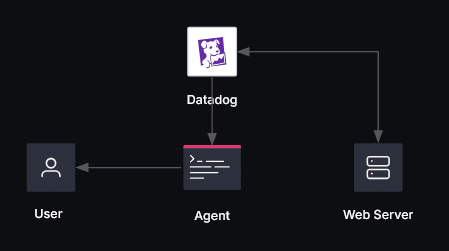
Alert source: datadog
Alert summary: [Triggered] demo-web-app health check failed
Boundary target: demo-web-server-target (tssh_w5P8tdqnGs)
Ephemeral Boundary account: acfaria-codex-agent-20260515t175636z
Investigation plan:
- Inspect demo-web-app.service and recent logs
- Read /etc/demo-web-app.env
- Probe http://10.0.70.88:8080/health

[service state]

$ systemctl is-active demo-web-app.service 2>&1 || true
activating

[service status]

$ sudo systemctl status demo-web-app.service --no-pager -l 2>&1 || true
● demo-web-app.service - Demo incident web service
     Loaded: loaded (/etc/systemd/system/demo-web-app.service; enabled; preset: enabled)
     Active: activating (auto-restart) (Result: exit-code) since Fri 2026-05-15 17:56:39 UTC; 2s ago
    Process: 2337877 ExecStart=/usr/bin/python3 /opt/demo-web-app/server.py (code=exited, status=1/FAILURE)
   Main PID: 2337877 (code=exited, status=1/FAILURE)
...

[recent logs]

$ sudo journalctl -u demo-web-app.service -n 30 --no-pager 2>&1 || true
May 15 17:56:16 ip-10-0-70-88 python3[2337158]: "GET /health HTTP/1.1" 200 -
May 15 17:56:32 ip-10-0-70-88 systemd[1]: Stopping demo-web-app.service - Demo incident web service...
May 15 17:56:32 ip-10-0-70-88 systemd[1]: Stopped demo-web-app.service - Demo incident web service.
...

[environment file]

$ sudo cat /etc/demo-web-app.env 2>&1 || true
PORT=not-a-number
MESSAGE=broken

[health endpoint]

$ curl -fsS http://10.0.70.88:8080/health 2>&1 || true
curl: (7) Failed to connect to 10.0.70.88 port 8080 after 0 ms: Couldn't connect to server
The local agent is configured to provide a diagnosis of the issue, along with impacted customers and related support tickets from a supporting PostgreSQL database. The account used to connect to that database (acfaria-codex-agent-20260515t175643z) for this query is dynamically created within Boundary through its integration with Vault. This ensures that the local agent has its own identity for this specific action. An SSH certificate for the web server is also dynamically generated for the agent with a short-lived expiration, which reduces the risk of being reused if exposed. Both the user and local agent are never exposed to these ephemeral ssh credentials at any given point in time, eliminating any chances of a credential leak. Also, for auditing purposes, Boundary logs that the agent account was created by the operator (acfaria).
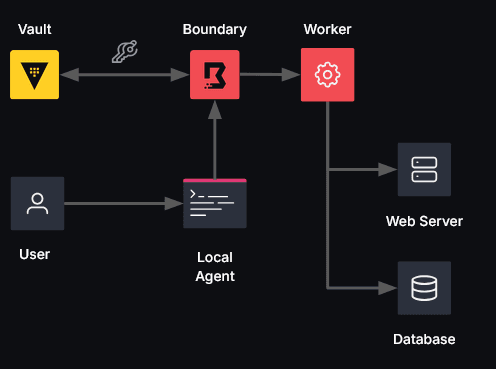
Diagnosis: The demo web service is down because its systemd environment file contains an invalid PORT value.

Reporting DB target: dev-psql-db-target (ttcp_O2J8EkDBRZ)
Reporting DB account: acfaria-codex-agent-20260515t175643z
Reporting plan:
- Identify the outage record for the affected host and service
- Pull all impacted customers and affected user counts
- Pull deployment error rates from the internal reporting dataset
- Correlate open support tickets tied to the outage
Reporting dataset scope: session temporary tables in pg_temp.

[reporting summary]

Outage demo-web-app-service-ip-10-0-70-88-outage for demo-web-app.service on ip-10-0-70-88 is open since 2026-05-15T17:42:45Z UTC.
Symptom: Synthetic health checks and application monitors report 5xx responses from the private demo web service.
Primary error: The service environment file contains PORT=not-a-number after the latest deployment.
Impacted customers: 4, affected users: 2915, open correlated tickets: 4

[impacted customers]

- Acme Bank (enterprise, us-east-1): 1840 affected users, 1 open tickets, Mobile balance checks and internal teller dashboards are timing out.
- Northwind Health (enterprise, us-west-2): 620 affected users, 1 open tickets, Appointment check-in API calls are failing for the private clinic portal.
- Contoso Retail (growth, eu-west-1): 310 affected users, 1 open tickets, Back-office inventory sync jobs are stalled behind the unhealthy service.
- Alpine Media (growth, ap-southeast-1): 145 affected users, 1 open tickets, Editorial publishing queue retries are climbing after repeated 5xx responses.

[deployment error rates]

- prod 2026.03.25.1 on 2026-05-15T17:38:45Z: 38.74% errors (4835/12480 requests) over 15 minutes, build 9f3c2ab
- canary 2026.03.25.1 on 2026-05-15T17:25:45Z: 33.40% errors (511/1530 requests) over 10 minutes, build 9f3c2ab
- prod 2026.03.24.7 on 2026-05-14T22:56:45Z: 0.29% errors (64/21950 requests) over 30 minutes, build 6aa91cd

[correlated support tickets]

- SUP-4821 SEV-1 open for Acme Bank at 2026-05-15T17:44:45Z UTC: Customer-facing banking portal returning 502 responses after latest deployment.
- SUP-4824 SEV-1 investigating for Northwind Health at 2026-05-15T17:47:45Z UTC: Clinic portal health check failing for appointment check-in traffic.
- SUP-4828 SEV-2 open for Contoso Retail at 2026-05-15T17:50:45Z UTC: Inventory reconciliation workers are retrying against the unhealthy private API.
- SUP-4832 SEV-2 new for Alpine Media at 2026-05-15T17:52:45Z UTC: Editorial publishing queue is degraded during content push windows.
A recommended remediation is then provided by the local agent. This remediation plan is reviewed by the operator who then determines if the actions should be approved or denied.
Recommended remediation:
- restore /etc/demo-web-app.env to PORT=8080 and restart demo-web-app.service

Commands to be executed through Boundary:
- restore environment file: printf 'PORT=8080\nMESSAGE=healthy\n' | sudo tee /etc/demo-web-app.env >/dev/null
- restart service: sudo systemctl restart demo-web-app.service
- verify service state: systemctl is-active demo-web-app.service
- verify health endpoint: curl -fsS http://10.0.70.88:8080/health

Authorize remediation? Type 'yes' to apply the recommended fix:
Once approved, the local agent will follow the given remediation plan and perform the necessary actions required to restore the service. Notice that the session account used for the remediation steps on the webserver is now different (acfaria-codex-agent-20260515t181615z). This is because the session account used to perform the previous actions was created for that intent only. Once its session is complete and purpose fulfilled, the account was deactivated and removed within Boundary. This ensures standing privileges are revoked, which significantly reduces the blast radius in the event of a compromised agent.
Applying remediation: restore /etc/demo-web-app.env to PORT=8080 and restart demo-web-app.service
Remediation session account: acfaria-codex-agent-20260515t181615z

[restore environment file]
$ printf 'PORT=8080\nMESSAGE=healthy\n' | sudo tee /etc/demo-web-app.env >/dev/null
(no output)

[restart service]
$ sudo systemctl restart demo-web-app.service
(no output)

[verify service state]
$ systemctl is-active demo-web-app.service
active

[verify health endpoint]
$ curl -fsS http://10.0.70.88:8080/health
{"status": "healthy"}

Incident resolved: the demo service is active and its health endpoint is responding again.
Throughout this entire workflow, our agentic incident response application was able to connect to multiple resources, diagnose the issue, provide the operator an overview of impacted services and customers, and resolve the issue with targeted JIT access without ever exposing any form of credentials to the operator or agent at any time.
We also ensured that the local agent’s actions were always tied to a specific intent. Any time a new session account was generated, we knew which operator generated that account, what the agent could do, and its purpose.
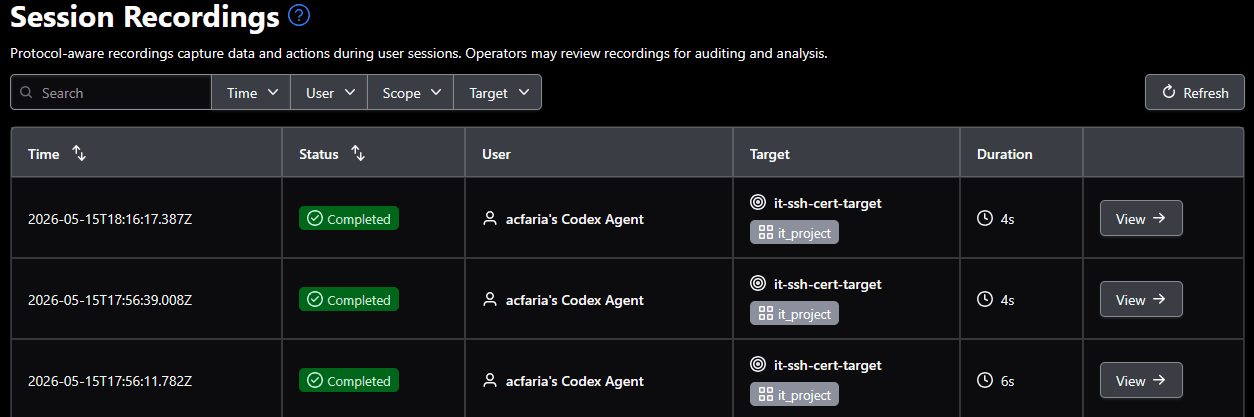
It’s also important to note that, by leveraging Boundary’s session recording capabilities, our admins and security team can track all operations and visualize any actions performed by the user’s local agent within the Boundary administrative console.
»Conclusion
With 56% of transformative organizations prioritizing improving AI-driven automation according to the HashiCorp Cloud Complexity report, the market direction is clear. Organizations need a defined runtime security approach for local agent usage across the board. Agentic AI operations will not be secured with static roles, long-lived credentials, or broad permissions. In this blog post, we demonstrated how Boundary, when paired with Vault, provides unique agent identities, JIT credentials, explicit delegation, point of use enforcement, and an auditable proof of control for local agents. This is the model that enables teams to implement production-grade agentic AI workloads at scale without introducing any additional, unwanted risk.
To learn more about how Boundary, Vault, and other HashiCorp products provide the controls essential for safe, scalable agentic AI adoption, check out our agentic runtime security page, or contact our team for a tailored consultation.
»Participate in early access
At IBM, we are continuing to develop and expand our agentic AI security capabilities and looking to get direct feedback from customers. As we roll out new Boundary capabilities, if you would like to be an early adopter and help shape our roadmap, join our Boundary Agentic Security Early Access Program.