

Over the past quarter, the HashiCorp Terraform engineering team has introduced new capabilities that make infrastructure management more resilient, scalable, and easier to operate. These updates help platform teams reduce operational overhead, strengthen governance, and scale infrastructure more efficiently. The latest HCP Terraform and Terraform Enterprise improvements include:
Workspaces and Stacks restore (GA)
Monorepo support for Stacks (GA)
Guided CLI migration from workspaces to Stacks (public beta)
Registry tagging with project registry view (GA)
Project and workspace policy override permissions (GA)
»Workspaces and Stacks restore
Feature gap: For many platform teams, a single line of incorrect code or a stray API call can wipe out a workspace or stack, leaving thousands of cloud resources orphaned and unmanaged. Restoring these environments currently requires a manual, error-prone process of importing orphaned resources one by one. This results in significant operational downtime, lost auditing context, and reduced confidence in enterprise-grade infrastructure management.
What's new: We are introducing the general availability of the workspaces and Stacks restore feature for HCP Terraform Standard and Premium customers. This new, dedicated recovery workflow allows administrators to restore a workspace or stack to its exact state prior to deletion with a single click. This includes run history, last known state, and workspace configuration (variables, vcs connections, other settings). Instead of being permanently erased, deleted workspaces and Stacks are moved to a dedicated Recoverable Items page, where they are retained for 30 days.
Benefits:
Increased productivity: The ability to see exactly what was deleted and restore it instantly — without rebuilding from scratch or losing weeks of historical context — saves platform teams significant time and effort.
Improved resiliency: Engineers now have the peace of mind of knowing their infrastructure is resilient to human and programmatic error with a simple recovery workflow. No more spending days manually re-importing resources and tracking down lost variables.
To learn more, you can check out:
» Monorepo support for Stacks
Feature gap: Modern platform teams increasingly standardize on monorepo architectures to centralize infrastructure, promote reuse, and simplify dependency management. However, Stacks currently assume a one-repository-per-stack model, making it difficult to manage multiple stack configurations within a single VCS repository. This limitation forces teams into suboptimal repo sprawl or complex workarounds and often results in unnecessary plan/apply runs that drive up computational costs when unrelated parts of a repository change.
What’s new: We are introducing the general availability of monorepo support for Stacks, enabling teams to manage multiple Stacks within a single repository — reducing operational overhead, accelerating development cycles, and minimizing unnecessary infrastructure runs. This includes two foundational features:
Working directory support: Teams can now configure a working directory for a Stack, allowing Terraform runs to execute from a specified subdirectory instead of the repository root. This enables multiple independent Stacks to coexist within a single VCS repository while sharing common modules and components, reducing repository sprawl and simplifying infrastructure organization.
Trigger patterns: Stacks can now selectively respond to file changes using pattern-based filtering. By scoping VCS webhook triggers to relevant files or directories, Stacks only initiate runs when changes directly impact their configuration. This avoids unnecessary plan and apply cycles caused by unrelated changes, reducing compute costs, improving feedback speed for developers, and minimizing the risk of unintended infrastructure updates.
Together, these capabilities provide a complete monorepo-friendly execution model, ensuring each Stack runs independently while sharing a common repository.
Benefits:
Simplified platform management: Teams can consolidate infrastructure into a single repository while maintaining clear boundaries between Stacks, reducing repository sprawl and operational complexity.
Improved efficiency: Fine-grained trigger controls ensure that only relevant Stacks run when changes occur, minimizing unnecessary plans and applies, reducing compute costs, speeding up feedback cycles for developers, and lowering the risk of unintended infrastructure changes.
Better modularity and reuse: Shared modules and components can live alongside Stack configurations, enabling tighter integration, improving consistency across environments, accelerating development through reuse, and lowering maintenance overhead.
To learn more about monorepo support in Stacks, check out:
»Guided CLI migration from workspaces to Stacks
Feature gap: Today, there is no supported or reliable path to migrate existing Terraform workspaces into Stacks. Customers looking to adopt Stacks must manually recreate configurations and re-import state, an error-prone, time-consuming process that carries significant risk, especially for production infrastructure. This lack of a structured migration path slows adoption and makes it difficult for teams to transition confidently to Stacks.
What’s new: We are introducing the public beta of a guided CLI-based migration that enables customers to safely and incrementally migrate from workspaces to Stacks. Rather than relying on a fully automated, opaque process, this solution follows a modular “toolbox” approach, giving practitioners control and visibility to validate each step of the migration.
This approach establishes a practical, repeatable migration path that can be executed manually or integrated with automation and AI-driven workflows.
Benefits:
Reduced migration risk: A guided, step-by-step workflow ensures infrastructure state and configuration are safely transitioned without introducing instability or data loss, so users can enjoy the benefits of using Stacks quickly.
Transparency and control: The modular design allows practitioners to validate, debug, and iterate at each stage instead of relying on a black-box migration process, improving accuracy and reducing unknown risks.
Scalable adoption of Stacks: Teams can migrate incrementally across many workspaces using a coordinated manifest-driven approach, making large-scale transitions faster and more feasible.
Automation-ready foundation: The CLI-based tooling can be leveraged by automation pipelines and AI agents, enabling repeatable migrations across environments to improve developer velocity.
To get started with this migration, see the Migrate HCP Terraform workspaces to Terraform Stacks documentation.
»Registry tagging with project registry view
Background: In May, we announced public beta of registry tags, allowing the platform team to tag artifacts with project information and usage guidance. Project tags on registry artifacts, available for all HCP Terraform users, and the new registry environment tags, available on HCP Terraform Standard and Premium, increase the accuracy and speed for downstream consumers when choosing artifacts without confusion or guesswork.
What's new: Today, we are excited to announce the general availability of registry tags. With this GA, all HCP Terraform users will also have registry view in each of their projects, which shows all artifacts that share tags with the project. This project registry view takes the guesswork out of knowing which artifacts are acceptable for each project for the downstream consumers.
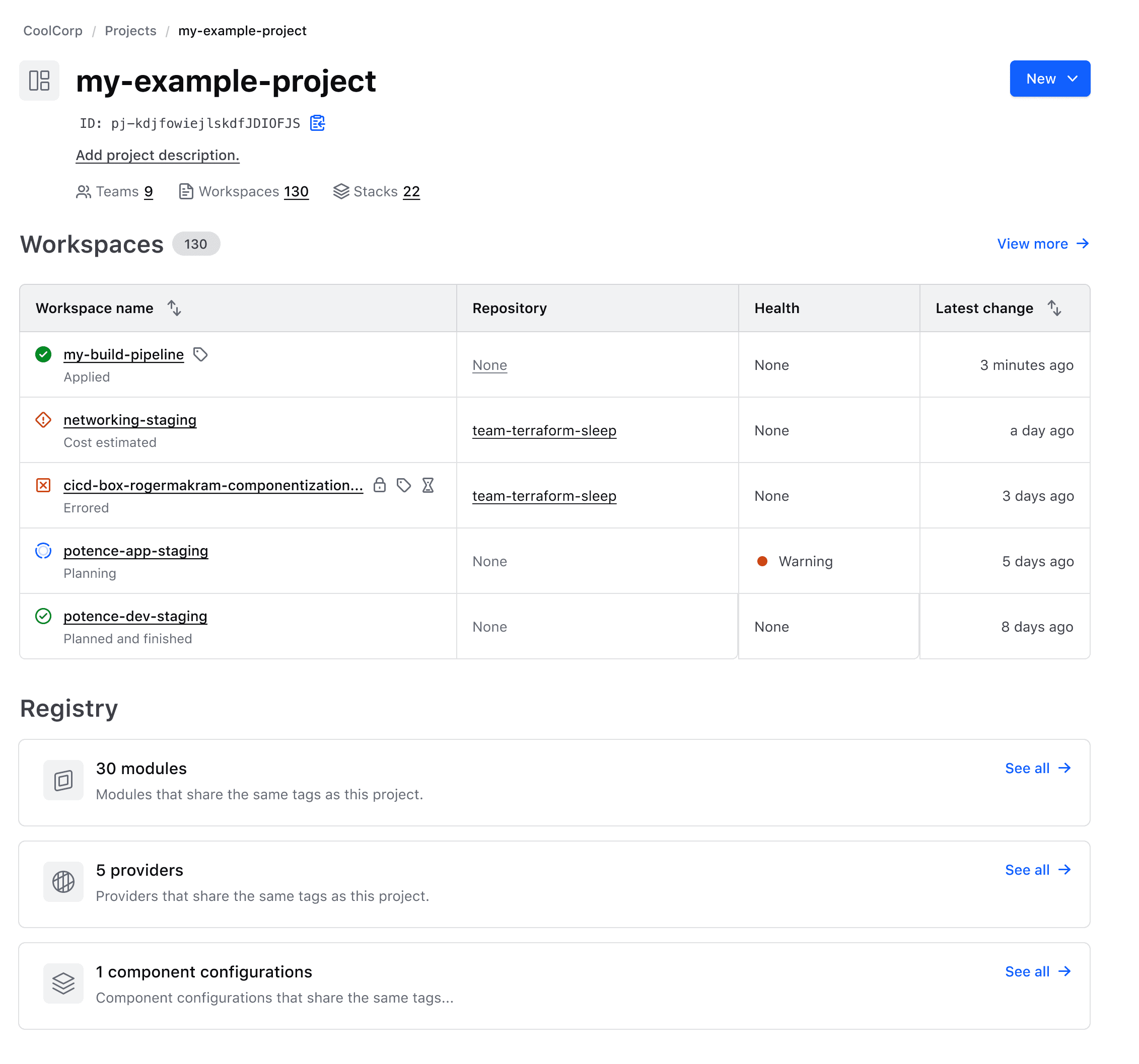
Your project registry view shows all artifacts tagged like the project, enabling faster discovery and selection.
To learn more, you can check out Manage artifact tags.
»Project and workspace policy override permissions
Feature gap: Until now, teams using policies in HCP Terraform and Terraform Enterprise had a single option for delegating policy override capabilities: granting the "manage policy overrides" permission at the organization level. Organization-wide scope provides visibility across all workspaces in the organization — broader access than many enterprises prefer to grant with their least-privilege security models. It also imposes unnecessary risk, since users can override policy on workspaces they otherwise couldn’t access.
What's new: We are enhancing policy override permissions for projects and workspaces in both HCP Terraform and Terraform Enterprise 2.0.0. Teams can now be granted the “manage policy overrides” permission, scoped to all workspaces within a specific project or to individual workspaces, providing precise control over where teams can override failed policy evaluations.
Benefits:
Simplified operations at scale: Customers can now delegate policy override capabilities aligned with their organizational structure. Each team operates within clearly defined boundaries, reducing the complexity of permission management across hundreds of teams and thousands of workspaces. This makes policy adoption more practical and manageable at scale.
Enhanced least-privilege controls: Organizations can now align policy override permissions with their existing project and workspace boundaries, ensuring teams have the exact level of access needed for their responsibilities. This granular control raises the bar for enterprise security practices and supports more sophisticated compliance requirements.
To learn more about configuring project-level and workspace-level policy override permissions, check out the HCP Terraform and Terraform Enterprise documentation.
»Get started with HCP Terraform and Terraform Enterprise
You can try many of these new features now. If you are new to Terraform, sign up for an HCP account to get started today, and also check out our tutorials. HCP Terraform includes a $500 credit that allows users to quickly get started using features from any plan, including HCP Terraform Premium. Contact our sales team if you’re interested in trying our self-managed offering: Terraform Enterprise.