

HashiCorp Consul is a service networking platform that enables organizations to discover, connect, and secure services across the network in dynamic infrastructure environments. At its core, Consul provides service discovery, allowing services to be registered and discovered based on a service identity.
Consul also includes health checking and load balancing to ensure traffic is routed only to healthy service instances. These capabilities set the foundation for Consul’s service mesh, which secures service-to-service communication through fine-grained authorization, mutual TLS (mTLS), and traffic control. This offloads application security responsibilities from developers and allows Consul to centrally enforce security across any cloud.
With the release of Consul 2.0, we’re further improving service networking for modern, multi-platform environments. This release introduces several key enhancements designed to improve flexibility, scalability, and operational efficiency:
Multi-port support for Consul service mesh on Kubernetes
Integration with CyberArk Workload Identity Manager as an external certificate authority
Global rate limiter for RPC traffic
API Gateway auto-scaling and performance flexibility
Together, these capabilities build on Consul’s core strengths and lay the foundation for the next generation of service connectivity.
»Multi-port for service mesh (beta) (Enterprise)
Consul service mesh now supports multi-port services (beta), allowing service workloads to send and receive traffic over multiple ports. While multi-port was introduced in the Consul version 1.22 release, it was only supported for service registration and discovery.
Prior to this release, services were only allowed to communicate over a single port. This prevented many distributed systems that expose multiple ports (like Kafka, CockroachDB, and Redis) from running on Consul. This also impacted legacy and modern applications that separate traffic types onto different ports.
With this improvement, workloads can now handle traffic across multiple ports without relying on creative workarounds. This reduces resource overhead and lowers operational complexity for managing multi-port services on the service mesh.
»CyberArk Workload Identity Manager as external CA (Enterprise)
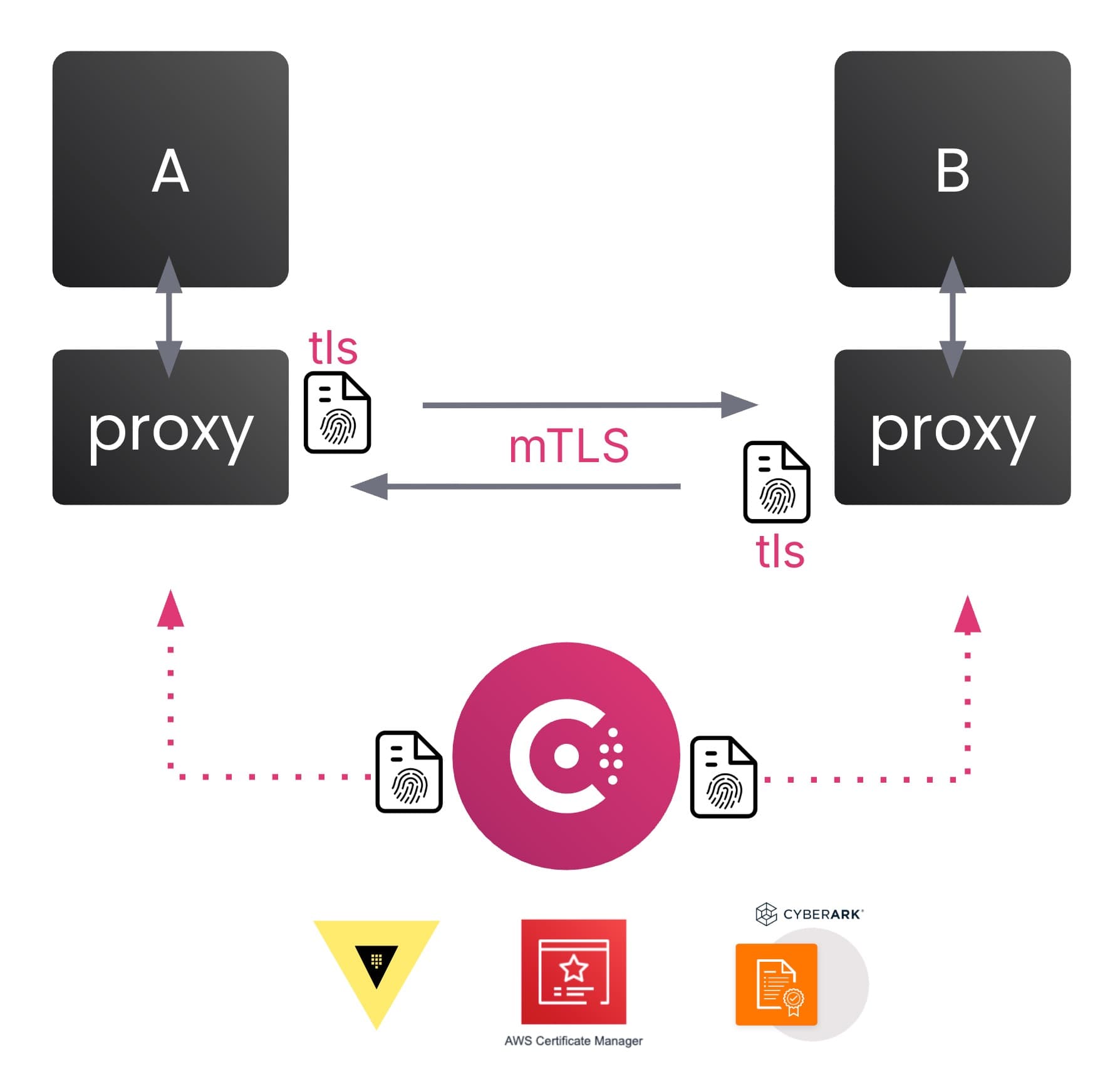
In the 2.0 version, Consul service mesh now supports CyberArk Workload Identity Manager as an external certificate authority (CA), adding more flexibility and choice for enterprise customers.
By facilitating the exchange of TLS certificates between services, Consul service mesh ensures mutual authentication prior to any service-to-service communication. This is called mutual TLS (mTLS) and is dependent on a certificate authority (CA) to generate, manage, sign, and store certificates to secure the service mesh.
Consul includes an internal built-in CA, which makes it easy to quickly deploy Consul service mesh. Consul also integrated with external CAs, but only supported HashiCorp Vault and AWS Certificate Manager prior to this release.
This latest release now adds support for CyberArk Workload Identity Manager (formerly known as Venafi Firefly) and can issue TLS certificates while preserving Consul’s SPIFFE‑based identity and multi‑data-center architecture. This addition provides more flexibility and options for large enterprise customers that often need mesh identities to be governed by an existing certificate issuance platform like CyberArk Workload Identity Manager for compliance, auditability, centralized policy, and separation of duties.
»Consul rate limiting for RPC (Enterprise)
Consul provides operators with the ability to configure rate limits on RPC and gRPC traffic, which helps mitigate the risks of overwhelming Consul servers when client agents or services send excessive read or write requests to Consul resources. However, rate limits were configured on each individual Consul server, which provides flexibility but can be error-prone.
This latest release improves management by allowing operators and platform teams to centrally configure RPC rate limits on the control plane for the entire cluster. Operators can define global read and write max limits that are enforced consistently across all Consul servers in real time. This complements the existing flexibility of configuring RPC limits on a per-server basis, while also reducing management by allowing a single authoritative control to protect cluster stability under load or incidents.
»Improved scaling for Consul API gateway (Enterprise)
The Consul API gateway allows external client services to securely route to destination services within the service mesh. This is commonly known as “north-south” traffic. The Consul API gateway helps organizations secure network traffic by securing the entry point into the mesh with TLS certificates from trusted providers.
In previous versions of Consul on Kubernetes, the maximum number of Consul API gateway instances in a Kubernetes cluster was eight. This was too restrictive and created a bottleneck for customers who have high-traffic use cases. In addition, previous versions did not support Kubernetes Horizontal Pod Auto-scaler (HPA) which automatically increases or decreases the number of instances (pods) based on usage of CPU, memory, or other custom metrics. Instead, operators had to manually set the number of instances using the defaultInstances parameter in the GatewayClassConfig CRD.
In the latest release, the maximum limit of Consul API gateway instances has been removed. This provides more flexibility and improves performance that had been previously limited by the API gateway. In addition, the Consul API gateway now supports Kubernetes HPA. Consul operators no longer need to manually set the number of Consul API gateway instances in order to scale. They can enable HPA and set the minimum and maximum limits using annotations in the GatewayClass CRD.
Example YAML file of a GatewayClass CRD:
apiVersion: gateway.networking.k8s.io/v1
kind: Gateway
metadata:
name: api-gateway
namespace: default

annotations:
# Enable controller-managed HPA
consul.hashicorp.com/hpa/enabled: "true"
consul.hashicorp.com/hpa/minimum-replicas: "2"
consul.hashicorp.com/hpa/maximum-replicas: "20"
consul.hashicorp.com/hpa/cpu-utilization-target: "70"
As a result, these improvements will reduce management burden on operators and enhance overall performance for Consul customers.
»Consul MCP Server is now open source
Laslty, we’re pleased to share that the Consul MCP Server repository is now public and available for open‑source collaboration.
The Consul MCP Server enables integration between Consul and the Model Context Protocol (MCP) ecosystem, allowing developers and platform teams to experiment, extend, and contribute in the open.
We welcome contributions from the community—whether that’s bug fixes, improvements, documentation updates, or feedback via issues and discussions. Contributions should follow IBM’s standard open‑source contribution workflow, including the required approvals and review steps.
Repository:
https://github.com/hashicorp/consul-mcp-server
If you’re interested in contributing, please review the repository README and contribution guidelines before getting started.
»Learn more about Consul 2.0
More detailed information and links are available in the Consul 2.0 release notes.
Get started with HashiCorp Consul through our many tutorials for both beginners and advanced users. You can start a free trial with Consul Enterprise to test out commercial features.